ONE CAR PHOTO. A CINEMATIC REVEAL.

Venom Car AI

Your car. Built from the shadows.

Create a Venom Car AI video online from 1 car photo. Black liquid crawls across a garage floor and assembles your vehicle in a continuous 13-second shot. Preview the reference for free, then choose 480p or 720p for a paid generation. No sign-up required for guest checkout.

  • 1 car photo
  • 13-second MP4
  • 20 or 45 credits
  • No added watermark
Reference video

The effect reference · Your car replaces the vehicle

01Create your car video

One complete car · Front or three-quarter view

Export quality
Video format
Results, photo requirements and privacy

The image supplies the car, paint and wheels. The reference video supplies the garage, camera movement and assembly. Exact details may vary. Confirmed generation failures return credits.

Upload one clear car photo, with the wheels and body visible. The template supplies the garage scene. JPG, PNG or WebP, up to 10 MB.

Upload an image you have permission to use. It is sent to the AI provider for generation. This browser may save a draft so you can continue after checkout or sign-in. Read our Privacy Policy

No account needed. Enter your email at checkout to receive a private video page when your video is ready.

480p · 9:16 · 13 seconds

Your balance
Loading…
This generation
20 credits

refunded on confirmed failure

Updated October 13, 2026 · Created and maintained by Chinaza Filter

01 / THE PROCESS

How does Venom Car AI work?

One image supplies the vehicle. The built-in reference supplies the garage, camera movement and assembly sequence.

01

Choose one car photo

Use a clear front or three-quarter view of one vehicle. Include the roof, bumpers and wheels; leave a little space around the car. JPG, PNG and WebP files up to 10 MB are supported. A visible badge helps, but a separate emblem upload is not needed.

02

Set your frame and quality

Choose 9:16 for a vertical reveal or 16:9 for a wider garage scene. A 13-second 480p video uses 20 credits; 720p uses 45 credits. The workbench shows the selected cost before you submit. You do not need to write a prompt or upload a reference clip.

03

Generate, review and save

The car photo and built-in video reference are sent to the AI provider. When the result is ready, watch the complete clip and download the MP4. Signed-in users can find it in My videos; guests receive a private result link. Save a local copy because media links can expire.

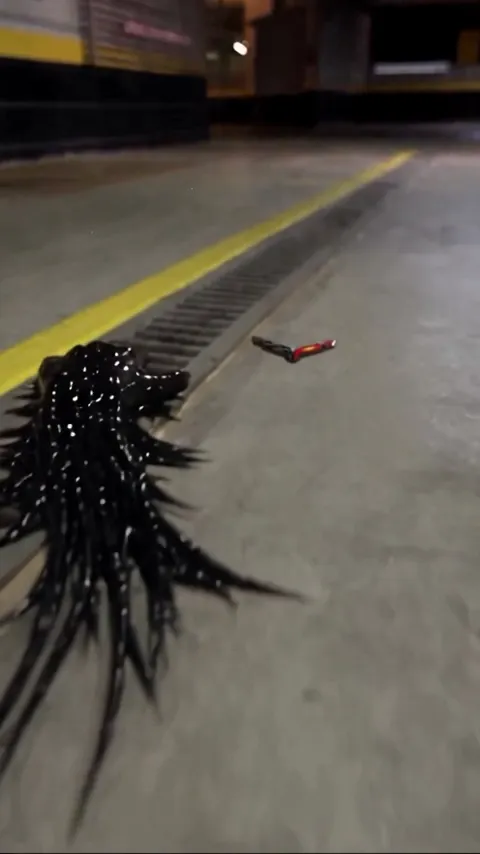
Venom Car AI reference: black liquid approaches a car emblem on a garage floorReference video source

02 / THE TRANSFORMATION

The Venom Car AI effect, beat by beat

The reference sets the visual direction. Your render is a new AI generation, so timing, vehicle details and audio can vary.

The crawl

Glossy black liquid moves across the concrete floor toward the car emblem. Reflections, garage lighting and a low camera angle establish the scene before the vehicle appears.

The assembly

The liquid wraps the emblem and grows into a chassis. Suspension and wheels take shape, followed by body panels and glass. The goal is a readable build in one continuous shot, rather than a cut between two still images.

The reveal

The finished car settles into the garage with its lights on. The prompt asks for your vehicle's body shape, paint and wheel design, with cinematic mechanical audio. Fine lettering and exact badge geometry are not guaranteed.

What makes a better car reference image?

Choose an image where the car is easy to distinguish from its surroundings. Soft daylight or even garage lighting usually gives the model more useful information than strong glare or deep shadows. Avoid a close crop that removes the wheels, and avoid a showroom photograph with several similar vehicles. The uploaded location is replaced by the template's garage: this effect preserves the vehicle as the subject, rather than keeping your original background still.

Clear settings before you generate

Setting480p Lite720p Standard
Duration13 seconds13 seconds
Credits per attempt20 credits45 credits
DownloadMP4MP4
Frame9:16 or 16:99:16 or 16:9

There are 0 free generation credits by default. Watching the reference is free. Guest packs start at $7.99 for 20 credits; signed-in packs start at $9.90 for 50 credits. These are one-time purchases with no subscription and no credit expiry. Each new attempt costs credits, including a rerun with the same photo. A confirmed generation failure returns the attempt's credits; dissatisfaction with a completed result is not an automatic credit refund.

Compare all credit packs

Venom Car AI questions, answered

What is Venom Car AI?

Venom Car AI is a car-photo video effect: a mass of dark liquid crosses a garage floor, reaches an emblem and builds a vehicle from its chassis to its finished body. On this website, it is a separate template from Chinaza Dynamic Filter. You upload one car image and the prepared reference guides a new cinematic video. It is an independent creative tool, with no film-studio affiliation.

Do I need to upload a video or a second picture?

No. Upload only one car photo. The generator already includes the reference video shown in the workbench. Your photo supplies the vehicle's appearance, while the reference guides the black-liquid movement, garage and assembly. There is no separate emblem input here. If the badge matters to your result, use a photo where it is clear and inspect it carefully in the output.

Is Venom Car AI free, and do I need to sign up?

The reference preview is free, but generation is paid and includes 0 free credits by default. Guest checkout needs an email address for the private result page and does not require an account. Account credit packs require sign-in. The selected resolution determines the credit cost: 20 credits for 480p or 45 credits for 720p. Review the pack and total at checkout before paying.

Will it keep my car's paint, wheels and background?

The prompt instructs the model to preserve the vehicle's model, silhouette, paint, wheels and visible badge from your uploaded image. It replaces the original setting with the reference garage. This differs from our dance template, which asks to retain the uploaded background. AI rendering may change small details, so compare the final car with your photo before sharing it as a representation of a real vehicle.

What can I download, and is there a watermark?

Download a 13-second MP4 at 480p or 720p, with 9:16 portrait or 16:9 landscape framing. The generation prompt requests no added text or watermark. Review your completed video for unexpected artifacts. Generated mechanical audio can differ from the reference soundtrack. Choose portrait for a vertical post, and check the current platform requirements before publishing.

Where is my car photo processed and stored?

Your selected photo is sent to the AI service provider to create the video. This browser may save an image-and-settings draft for up to 24 hours after its last save so you can continue after checkout; expired drafts are removed when next read. Generated media links may expire, so download files you want to keep. See the Privacy Policy for the published data-handling terms.

What happens if a generation fails?

A confirmed failed generation returns the credits used for that attempt. A temporary polling or connection error does not necessarily mean the provider stopped rendering. Check the existing task before submitting again to avoid starting another paid attempt. For help with a task or payment, contact support with the task or order ID and error message. Never send an API key or payment-card details.

Which car photo should I use for the first test?

Start with a sharp three-quarter image showing one complete car in even light. Keep the wheels, body edges and roof visible, and avoid people standing across the vehicle. A sports car, SUV, pickup or classic can be used, but unusual shapes and heavily modified bodywork may vary more. Try 480p to review the sequence first; select 720p for a new higher-resolution generation if you want another take.

YouTube guidance on disclosing synthetic content

Keep creating

Animate people with Chinaza Dynamic Filter, review credit packs, or read how uploads and downloads work.